Your ears can detect pressure changes smaller than a billionth of atmospheric pressure, according to HyperPhysics at Georgia State University. That is why the diaphragm only has to move a tiny distance for you to hear it.
Anatomy: what's inside
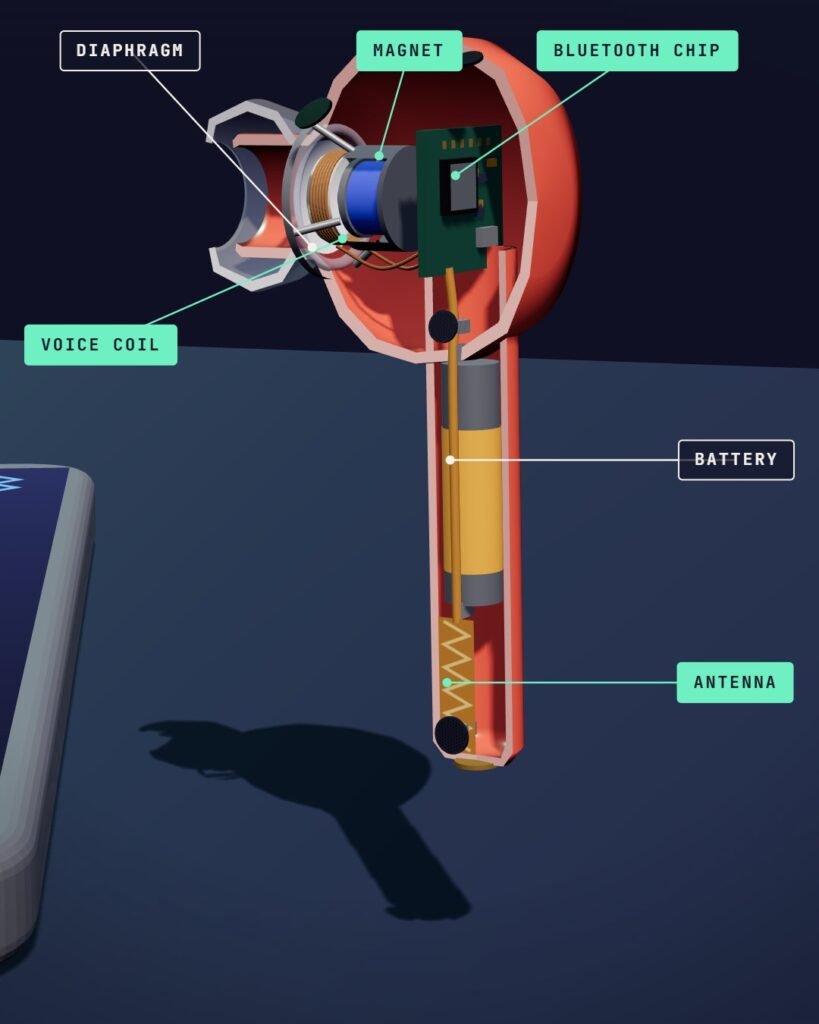
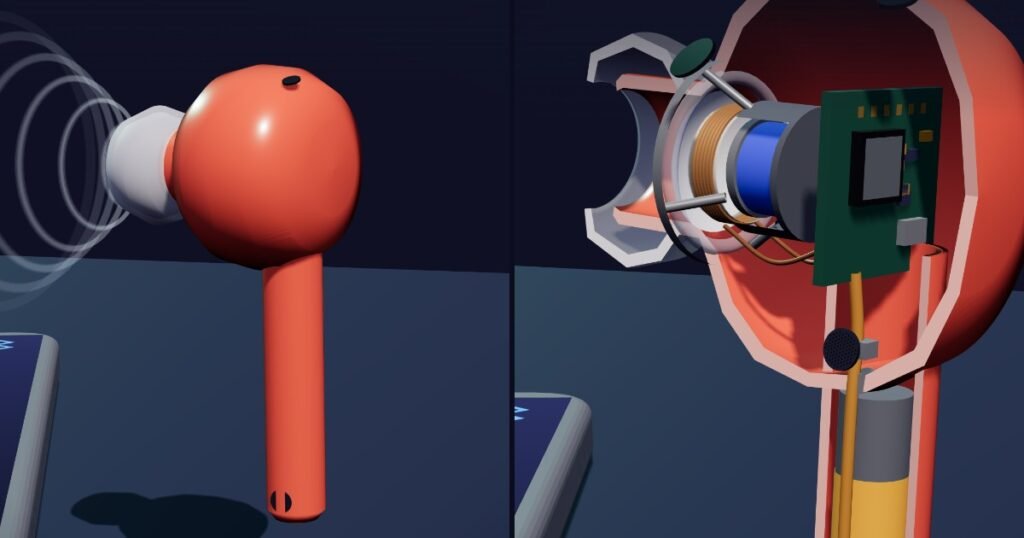
Antenna
A small antenna built into each bud catches the 2.4 GHz Bluetooth signal.
Bluetooth chip
Follows the radio hops, unpacks the compressed audio and, with a DAC and amplifier, turns it into a voltage that rises and falls like the sound wave.
Battery
A tiny rechargeable battery in each bud (lithium-ion in AirPods, for example). It sets how long you can listen between trips to the case.
Component: BatteryVoice coil
A light coil of wire attached to the diaphragm. The audio current flows through it, so the magnet can push and pull on it.
Component: CoilMagnet
A permanent magnet whose field surrounds the voice coil. Current in the coil feels a force from this field and moves in and out.
Component: MagnetDiaphragm
A thin, light dome moved by the voice coil. It pushes the air in your ear canal, making the sound you hear.
Ear tip and mesh
A soft tip holds the bud in your ear, and a fine mesh covers the speaker opening. Debris on the tip or mesh can lower sound quality.
Charging case
Holds a bigger battery that recharges the buds through metal contacts, several times over, before the case itself needs charging.
No wires, just radio, a chip and a magnet
Wireless earbuds seem to pull music out of thin air. In fact the song travels as radio from your phone to your earbuds, where the same basic parts as in an ordinary loudspeaker turn it back into sound: a coil of wire, a magnet and a thin diaphragm. Here is the whole trip, using a typical true wireless earbud. Brands differ in the details.
First, the phone makes the music smaller
A song at CD quality is a long list of numbers: 44,100 samples a second for each of two channels, 16 bits per sample. That adds up to about 1,411 kilobits every second. The radio’s top raw rate is 1, 2 or 3 megabits per second, depending on its mode, according to the Bluetooth SIG’s technology overview. Bluetooth’s music profile doesn’t send the raw stream, though. Before the music leaves your phone, a codec (short for coder-decoder) packs it into far fewer bits.
The one codec every device using A2DP, Classic Bluetooth’s music profile, must support is SBC, the SubBand Codec. The A2DP specification mandates SBC and lists others, such as AAC and MP3, as optional. Its recommended settings run from 127 to 345 kilobits per second. Set against the 1,411 worked out above, that is a quarter of the CD rate or less. If your phone and earbuds share a fancier codec, they can use it. If not, SBC is always there as the fallback.
Radio at 2.4 GHz that never sits still
The packed music goes out as radio waves between 2.402 and 2.480 GHz, in the unlicensed 2.4 GHz band, the Bluetooth SIG says. Bluetooth Classic, which the SIG calls the standard radio behind wireless headphones and speakers, divides that range into 79 channels spaced 1 MHz apart.
The link never stays on one channel for long. Phone and earbuds follow the same hopping pattern, so they land on the same channel at the same moment. The Bluetooth Core Specification sets the maximum hop rate at 1,600 hops per second for a connected link. It also divides time into slots 625 microseconds long. By simple arithmetic, 1,600 hops a second is one hop every 625 microseconds, or one per slot. The reason, in the spec’s own terms: hopping reduces the effects of interference.
A newer standard, LE Audio, carries sound over Bluetooth Low Energy instead, which uses 40 channels spaced 2 MHz apart. On the SIG’s page, an audio expert at Fraunhofer IIS says listening tests showed its LC3 codec improves on SBC’s audio quality even at a 50 percent lower bit rate. The SIG adds that it can send multiple independent, synchronized audio streams from one source to one or more devices.
Sharing the air with Wi-Fi and microwave ovens
The 2.4 GHz band is busy. Sony’s help guide for its WF-XB700 earbuds notes that Bluetooth and Wi-Fi share this band, and lists a running microwave oven as a cause of skipping sound.
US FCC rules for this band allow a frequency-hopping system to recognize other users and adapt its hops to avoid occupied channels, as long as it still uses at least 15. Bluetooth calls this adaptive frequency hopping. Under the Core Specification, a device may mark a channel as bad when too many transmissions on it fail, and hops that would land on a dropped channel are moved to one still in use.
When the sound still skips, Sony’s guide points to these causes:
- Your own body. A person between the earbuds and the phone can block the signal. Keep the phone on the same side as the earbuds’ antenna.
- Metal or walls between the two devices.
- Crowded airwaves. Sony suggests staying at least 10 m (30 feet) from a Wi-Fi device, or switching it off.
- Distance. Keep the phone and earbuds as close together as you can.
- A busy phone. Close apps you don’t need, or restart the phone.
- Codec settings. Try changing the phone’s wireless playback-quality setting, or fix it to SBC.
Inside each bud: antenna, chip, voltage
Each bud has its own small antenna built into its body. The antenna feeds a Bluetooth chip, which follows the hops and unpacks the compressed audio back into a stream of numbers.
Numbers can’t move a speaker, so a digital-to-analog converter (DAC) turns them into a voltage that rises and falls like the original sound wave, and a small amplifier makes that signal strong enough to drive the speaker. As HyperPhysics at Georgia State University puts it, the amplified signal makes the voice coil vibrate in a pattern that follows the original.
A loudspeaker small enough for your ear canal
A typical earbud makes sound with a moving-coil, or dynamic, driver: a thin diaphragm, a light coil of wire attached to it (the voice coil), and a permanent magnet.
A wire carrying current in a magnetic field feels a force at right angles to the wire, HyperPhysics explains. The voice coil sits in the magnet’s field and is free to move. Current one way pushes it out; current the other way pulls it back. The diaphragm, held at its edge by a flexible mounting, moves with the coil and pushes on the air, making pressure waves that more or less copy the original sound.
It has to be fast. Human hearing covers roughly 20 Hz to 20 kHz, according to HyperPhysics, so the coil moves in and out anywhere from 20 to 20,000 times a second. It doesn’t have to move far: your ear can detect pressure changes smaller than a billionth of atmospheric pressure.
From your phone to your eardrum
- Encode. The phone compresses the song with a codec such as SBC.
- Transmit. Its radio sends the data at 2.4 GHz, hopping channels up to 1,600 times a second.
- Catch. The bud’s antenna picks up the signal, and its chip follows the same hops.
- Decode. The chip unpacks the audio into a stream of numbers.
- Convert. A DAC and an amplifier turn the numbers into a rising and falling voltage.
- Move. Current in the voice coil, inside the magnet’s field, shoves the coil and diaphragm in and out.
- Hear. The diaphragm pushes the air in your ear canal, and the pressure waves reach your eardrum.
The case is a battery for your batteries
Each bud carries a tiny rechargeable battery. Apple, for example, lists AirPods among its products that use lithium-ion batteries. The charging case holds a bigger one. Apple says the case holds multiple full charges for your AirPods, and that keeping them in the case when you’re not using them keeps them charged. The buds charge through metal contacts that touch matching contacts in the case.
Lithium-ion batteries wear with use. Apple explains that capacity diminishes slightly with each complete charge cycle, meaning 100 percent of capacity used, even if spread over several days. On some AirPods, Optimized Battery Charging waits to charge fully until just before you usually need them, which Apple says is designed to reduce battery wear.
How loud is too loud
The NIDCD, part of the US National Institutes of Health, lists listening at high volume through earbuds or headphones as a risk, and puts music through headphones at maximum volume at 94 to 110 dBA. Long or repeated exposure at or above 85 dBA can cause hearing loss. It damages hair cells in the inner ear, and in people those cells don’t grow back.
Time matters too. The World Health Organization says 80 dB is safe for up to 40 hours a week, but 90 dB only for four. It advises keeping the volume below 60 percent of maximum and using well-fitted, noise-cancelling earphones, so you aren’t tempted to turn up the sound in noisy places.
Keep your earbuds working well
- Clean the mesh dry. For its Galaxy earbuds, Samsung says debris on the ear tip or mesh can cause low or poor audio. It advises removing the tip and using a cotton swab and a dry brush, never a metal brush, alcohol or soapy water, and not holding the buds upright. Other makers’ instructions differ, so check yours.
- Keep the contacts clean and dry. Samsung suggests a cotton swab for the charging contacts on the buds and in the case, and drying off sweat to prevent corrosion.
- Store them in the case when you’re not listening, so the buds stay charged.
- Keep the firmware current. AirPods firmware updates install automatically while they charge near an iPhone, iPad or Mac on Wi-Fi.
- If the sound keeps skipping, put the buds back in the case, close the lid, then connect again, as Sony’s WF-XB700 guide suggests.
How it works, step by step
Encode
Your phone compresses the song with a codec. SBC is the one every A2DP (Classic Bluetooth music) device must support.
Hop
The phone’s Bluetooth radio sends the data at 2.4 GHz, jumping among up to 79 channels, up to 1,600 times a second.
Catch and decode
The bud’s antenna picks up the signal, and its chip follows the same hops and unpacks the audio into a stream of numbers.
Convert
A digital-to-analog converter and an amplifier turn those numbers into a voltage that rises and falls like the sound wave.
Move
Current in the voice coil, inside the magnet’s field, pushes the coil and the attached diaphragm in and out.
Hear
The diaphragm pushes the air in your ear canal, and those pressure waves reach your eardrum.
Myth vs fact
Bluetooth sends the song exactly as it is stored, at full CD quality.
The music is compressed first. SBC, the codec every A2DP device must support, has recommended settings of 127 to 345 kilobits per second, while CD-quality stereo needs about 1,411.
Bluetooth stays on one channel, like an FM radio station.
Bluetooth Classic hops among 79 channels, up to 1,600 times a second, and with adaptive frequency hopping it can drop channels where transmissions keep failing.
If the sound skips, the earbuds must be broken.
Sony’s help guide for its WF-XB700 earbuds lists a body, metal or walls between phone and earbuds, wireless LAN and microwave ovens as things that can make sound skip. It suggests keeping the phone close, and on the same side as the earbuds’ antenna.
Leaving earbuds in the case all the time is bad for them.
Apple recommends keeping AirPods in the case when you’re not using them so they stay charged, and on some models Optimized Battery Charging holds back a full charge to reduce battery wear.
Loud listening for long periods can permanently damage your hearing. The NIDCD says long or repeated exposure to sounds at or above 85 dBA can cause hearing loss, and music through headphones at maximum volume can reach 94 to 110 dBA. The WHO advises keeping the volume below 60% of your device’s maximum and getting your hearing checked if you notice persistent ringing in your ears.
Questions people ask
Why does my music cut out when my phone is in my back pocket?
Your body is between the phone and the earbuds, and Sony lists that in its WF-XB700 guide as a cause of skipping sound. Try keeping the phone on the same side as the earbuds’ antenna, or simply closer to them.
Do wireless earbuds use Wi-Fi?
No. They use Bluetooth. But Bluetooth shares the 2.4 GHz band with many Wi-Fi networks, and Sony lists nearby Wi-Fi and running microwave ovens as causes of dropouts. Bluetooth hops between channels, and can skip bad ones, to work around interference.
How does the case charge the earbuds?
The case holds a bigger battery. When you drop the buds in, metal contacts on each bud touch matching contacts in the case, and the case tops up their batteries. Apple says its AirPods cases hold multiple full charges.
What is LE Audio?
A newer form of Bluetooth audio that runs on the Bluetooth Low Energy radio. Its LC3 codec has beaten SBC on sound quality in listening tests, even at a lower bit rate, according to Fraunhofer IIS as quoted by the Bluetooth SIG. It supports multiple independent, synchronized streams and Auracast broadcast audio. It only works when both devices support LE Audio.
How loud is it safe to listen?
The WHO says 80 dB is safe for up to 40 hours a week, but 90 dB only for four hours a week. It advises keeping the volume below 60% of maximum and using well-fitted, noise-cancelling earphones so you don’t turn it up in noisy places.
Sources
Published by Cut It Open. Checked against every listed source before publishing.
Facts last verified 2026-11-02
Published November 3, 2026 · Updated November 2, 2026